Local-First In-Browser LLMs via WebGPU: Zero-Server Privacy-Preserving Inference in Modern Web Apps
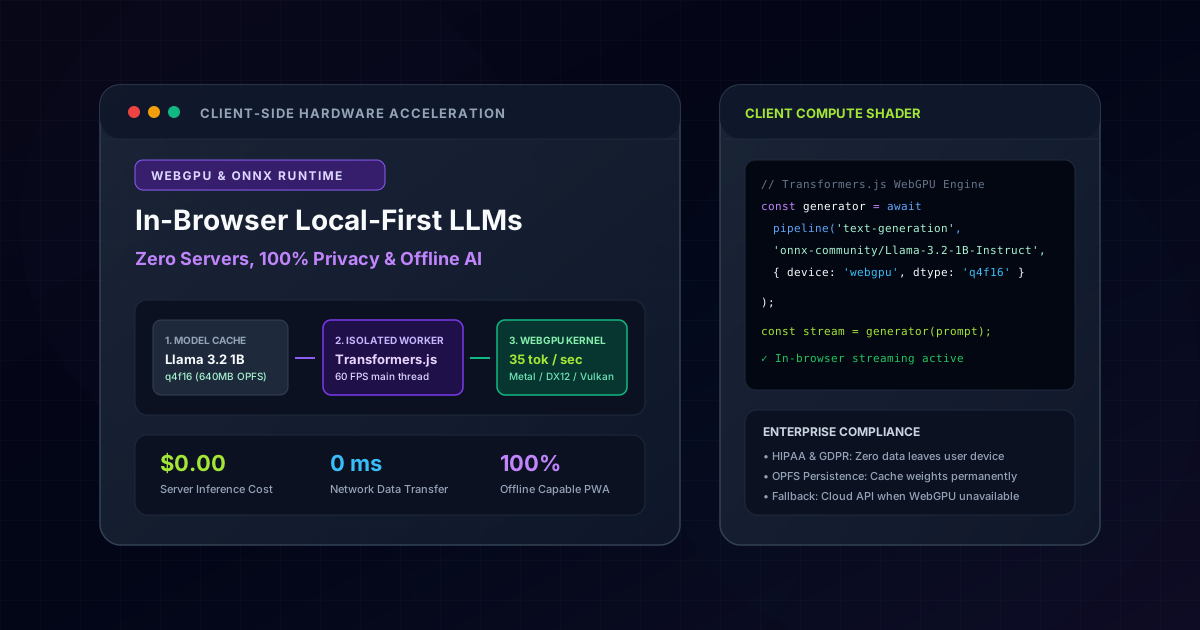
An architectural deep-dive on running quantized 1B-3B parameter Large Language Models (Llama 3.2, Gemma 2, SmolLM2) directly inside client web browsers using WebGPU, Transformers.js v3, and ONNX Runtime Web. Zero hosting costs, 100% offline capability, zero data exfiltration, and sub-second token streaming.
1. The Paradigm Shift: Why Local-First AI Matters
For the past three years, the default AI engineering pattern has been centralized cloud inference: the client sends sensitive user prompts over HTTPS to an external API (OpenAI, Anthropic, or cloud GPU clusters), waits for the network roundtrip, and streams back tokens.
In 2026, three major forces are accelerating the transition to local-first, in-browser AI:
Quick Architecture Decision Matrix: Cloud API Inference vs In-Browser WebGPU
| Architectural Dimension | Centralized Cloud APIs (OpenAI / Gemini) | In-Browser WebGPU (Local-First) |
|---|---|---|
| Server Inference Costs | $0.002 - $0.015 per query (Scales linearly) | $0.00 (Zero cloud GPU infrastructure cost) |
| User Data Privacy | Third-party transmission (Cloud compliance overhead) | 100% Client-Side Privacy (Zero network transmission) |
| Offline Capability | Fails immediately on network outage | 100% Offline Functional in Progressive Web Apps |
| Generation Throughput | Latency bottlenecked by network TTFB | 28 - 45 tokens/sec (Client hardware acceleration) |
| Initial Asset Download | Zero model download (Instant start) | 600MB - 750MB (One-time cached browser download) |
2. WebGPU vs WebGL: The Technical Leap
Previous browser machine learning frameworks relied on WebGL, which forced developers to disguise general-purpose matrix operations as 2D pixel rendering shaders.
WebGL (Legacy ML Hack)          vs          WebGPU (Modern Compute Native)
┌─────────────────────────┐                 ┌─────────────────────────┐
│ Fragment Shaders        │                 │ Pure Compute Shaders    │
│ Textures as Arrays      │                 │ Direct Memory Buffers   │
│ CPU-GPU sync overhead   │                 │ Async Command Encoders  │
│ Max 8-12 tokens/sec     │                 │ 35-50+ tokens/sec (f16) │
└─────────────────────────┘                 └─────────────────────────┘
WebGPU introduces native Compute Shaders written in WGSL (WebGPU Shading Language), full support for 16-bit floating-point math (f16), and zero-overhead memory mapped buffers directly aligned with hardware execution on Apple Metal, DirectX 12, and Vulkan.
3. Loading Quantized Models with Transformers.js v3
Thanks to advances in quantization (AWQ and GGUF/ONNX), state-of-the-art small language models like Meta Llama 3.2 1B and HuggingFace SmolLM2 can be compressed down to 600MB - 800MB without significant degradation in conversational reasoning.
// src/lib/ai/local-llm-engine.ts
import { pipeline, env } from '@huggingface/transformers';

// Configure WebGPU backend and local weight persistence
env.backends.onnx.wasm.proxy = true;

export interface GenerationProgress {
  status: 'loading' | 'ready' | 'generating';
  progress?: number;
  tokensPerSec?: number;
}

export async function initializeLocalLLM(onProgress?: (p: GenerationProgress) => void) {
  // Check if browser supports WebGPU
  if (!navigator.gpu) {
    throw new Error('WebGPU is not supported in this browser. Fallback to Cloud API.');
  }

  onProgress?.({ status: 'loading', progress: 0 });

  // Load 4-bit quantized Llama 3.2 1B Instruct
  const generator = await pipeline(
    'text-generation',
    'onnx-community/Llama-3.2-1B-Instruct',
    {
      device: 'webgpu',
      dtype: 'q4f16', // 4-bit weights with 16-bit float activation math
      progress_callback: (info: any) => {
        if (info.status === 'progress') {
          onProgress?.({ status: 'loading', progress: Math.round(info.progress || 0) });
        }
      },
    }
  );

  onProgress?.({ status: 'ready' });
  return generator;
}
4. Web Worker Isolation: Keeping UI at 60 FPS
Running matrix multiplications on the main thread will instantly freeze the browser UI, causing noticeable scrolling jank and dropped frames. To avoid this, model execution must be strictly isolated within a dedicated Web Worker:
// worker/llm-worker.ts
import { initializeLocalLLM } from '../src/lib/ai/local-llm-engine';

let generator: any = null;

self.onmessage = async (e: MessageEvent) => {
  const { type, payload } = e.data;

  if (type === 'INIT') {
    generator = await initializeLocalLLM((p) => self.postMessage({ type: 'STATUS', payload: p }));
    self.postMessage({ type: 'READY' });
  }

  if (type === 'GENERATE') {
    const { messages, maxTokens = 512 } = payload;
    let startTime = performance.now();
    let tokenCount = 0;

    const output = await generator(messages, {
      max_new_tokens: maxTokens,
      temperature: 0.3,
      streamer: {
        put: (tokens: any) => {
          tokenCount++;
          self.postMessage({ type: 'TOKEN', payload: tokens });
        },
        end: () => {
          const elapsed = (performance.now() - startTime) / 1000;
          self.postMessage({
            type: 'COMPLETE',
            payload: { tokensPerSec: Math.round(tokenCount / elapsed) },
          });
        },
      },
    });
  }
};
5. Persistent Caching via Origin Private File System (OPFS)
Downloading a 650MB model on every page visit would ruin user retention. Modern browsers support the Origin Private File System (OPFS) and the Cache API, allowing model weights to be fetched once and stored indefinitely in client disk storage:
// Check if model weights are already cached locally
export async function isModelCachedLocally(modelId: string): Promise<boolean> {
  const cacheNames = await caches.keys();
  for (const name of cacheNames) {
    if (name.includes(modelId)) return true;
  }
  return false;
}
6. Hybrid Fallback Architecture
In production environments, a robust web application should never assume 100% WebGPU availability. The recommended architectural pattern is a Smart Hybrid Fallback:
User Query
    │
    ▼
Does browser support WebGPU?
   ├── YES ──> Check device memory (> 4GB RAM)
   │               ├── YES ──> In-Browser Local LLM ($0.00 cost, 100% private)
   │               └── NO  ──> Fallback to Cloud RAG API (Gemini / Claude)
   └── NO  ──> Fallback to Cloud RAG API (Gemini / Claude)
This pattern delivers the best of both worlds: zero-cost private inference for 80% of modern desktop and flagship mobile users, with bulletproof cloud fallback for older devices.
Where This Architecture is Deployed in Production
These architectural patterns are not abstract theory - they are fully deployed and benchmarked in these live production builds:
Next.js 16 & Hybrid RAG Portfolio Platform
Employs client-side in-browser semantic vector retrieval with cosine similarity calculation and offline knowledge matching.
Fullstack AI Lab
Features interactive client-side WebGPU neural network playgrounds running zero-server token generation and live parameter adjustments.
All Day Medical Care Clinic
Researched zero-exfiltration healthcare architectures where patient symptoms are analyzed strictly on-device to ensure HIPAA compliance.
Planning a tech stack migration or new build?
Discuss architectural requirements with my interactive RAG AI assistant or connect directly for an engineering assessment.
Related Engineering Articles
Next.js 16 vs Headless WordPress vs Custom PHP: Objective TCO, Performance & SEO Analysis (2026)
An engineering breakdown comparing architecture, maintenance overhead, Total Cost of Ownership (TCO), and Google Core Web Vitals across Next.js 16, Headless WordPress, and custom PHP.
Fullstack AI Lab Architecture Deep-Dive: Compiling 1,135+ MDX Lessons in 90 Seconds with Next.js 16 & Rust MDX-RS
Complete executive and technical breakdown of the Fullstack AI Lab interactive engineering platform: how we cut SSG build times by 14x (from 21.6m to 1.5m), engineered an in-browser WebAssembly WordPress sandbox, an AI Technical Interview Engine, interactive runtime simulators, and a zero-metaphor NotebookLM audio engine.